One appliance. One pipeline.
Every device, accounted for.
A plug-and-play, self-configuring security control platform that sees what’s on your network, classifies every device into one of eight states, and cuts the alerts you triage by 70% — then tells you, in plain language, what to do next. Decisions are deterministic. AI is the explanation layer. Both are auditable.
From signal to action — in one pipeline.
Five stages, all running on the same edge appliance. Click any stage to see what happens there.
Click any stage above
Sense everything moving on the network.
Four detection capabilities running side-by-side on the edge appliance — each configured for safety on production networks.
- Network IDSField-proven signature-based intrusion detection at line rate. Surfaces active threats, never blocks.
- Asset inventoryEvery device fingerprinted — make, model, OS, role. Including things no MDM or EDR will ever see.
- Vulnerability scanningFull CVE landscape per device with KEV awareness — what’s known to be actively used in attacks.
- Behavioural baseliningUnderstands what normal looks like on this network so it can tell you when something isn’t.
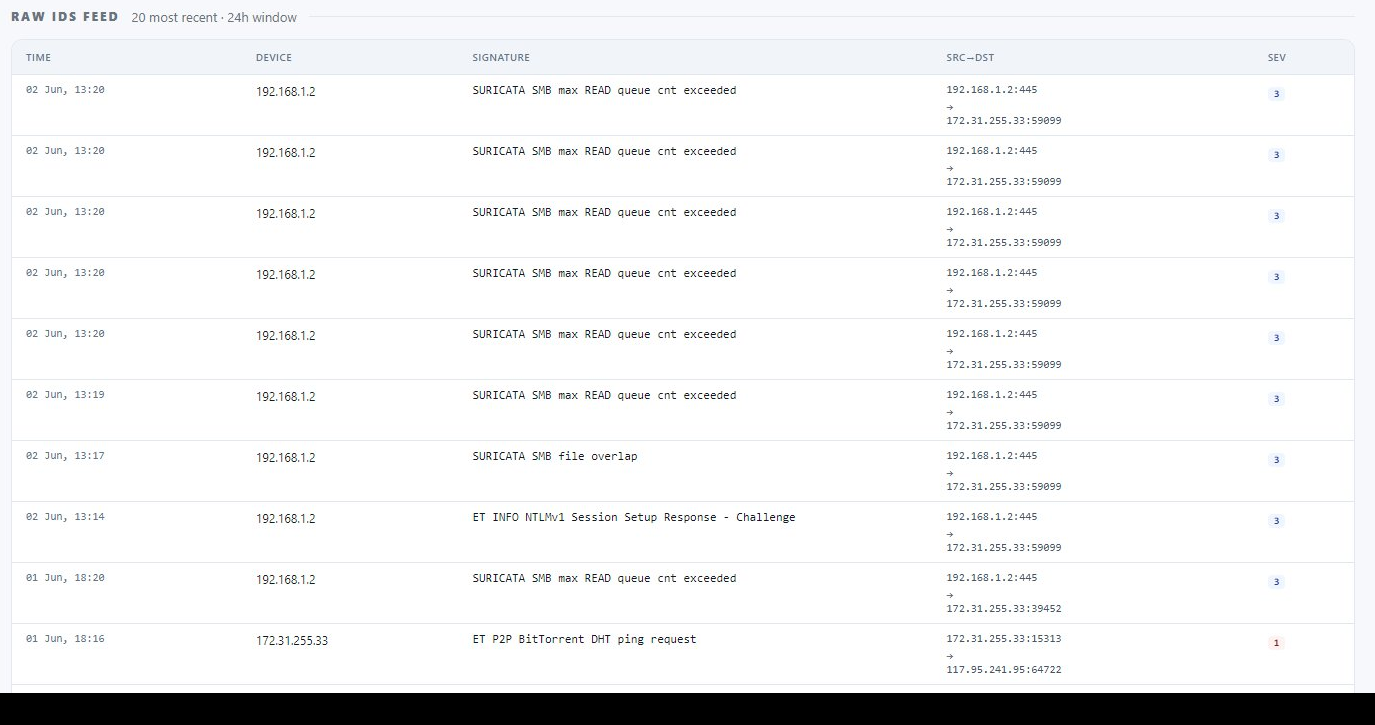

Join the signals into evidence.
Detection signals on their own are noise. The CVP correlation engine — proprietary, patent-protected — joins detection signals with vulnerability state and behavioural context to surface what genuinely matters.
- Signal × vulnerabilityAn IDS firing matters more on a device with a known-exploited CVE. The engine knows the difference.
- False positive filteringMost IDS alerts on a typical network are benign. Correlation against vuln state and behaviour filters out the noise.
- Patent-protected logicThe correlation approach — proprietary to CVP — is the differentiator no other platform replicates.
- Behavioural contextThe same signal carries different weight depending on the device’s normal patterns. Context is factored in.
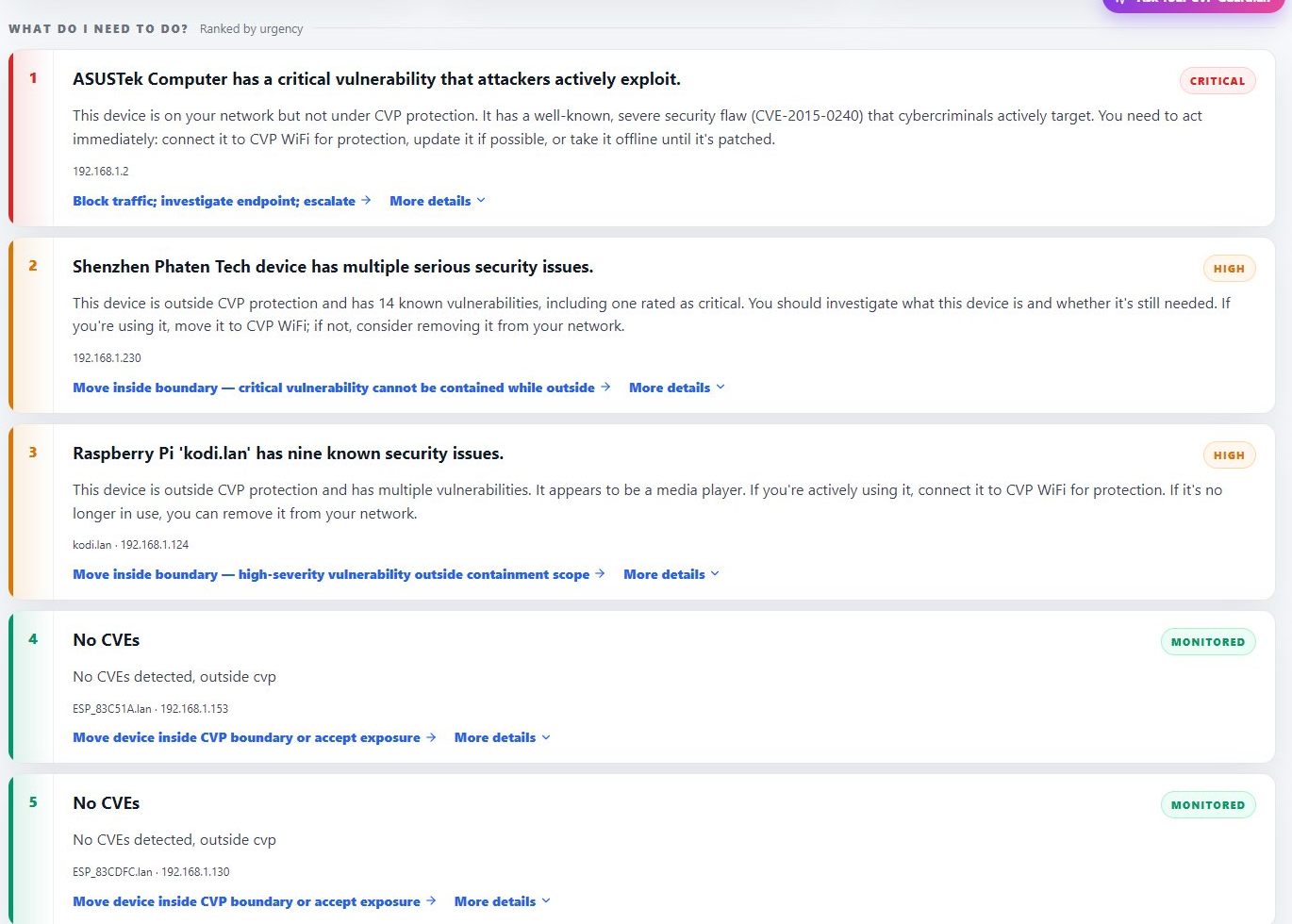

Every device, one of eight states.
After correlation, every device sits in exactly one of eight canonical states — ranked by priority, scored deterministically, explained in plain English. The output the operator actually works from.
Make the output understandable.
Three views in the portal — each tuned for a different role. Plus the Guardian, a conversational AI for one-tap answers. AI is the explanation layer only; it never decides.
Respond at the speed your environment requires.
Three response modes — pick the one that fits the site and the scenario. Same platform, same audit trail. What changes is how much of the response sits with your team versus ours, and whether automated containment is enabled for the specific scenarios you pre-authorise.
Clear alerts.
The portal surfaces findings in plain language with recommended actions. Your team runs the response.
Guided response.
Managed monitoring with defined SLAs. Triage, escalation, operator follow-through — our team or your channel partner’s.
Active containment.
A customer-defined pathway to pre-authorised automated containment, scoped to the specific action surface you choose. Every action audit-logged.
Every device. One of eight states.
Click any state to see the classification rule, an example scenario, and the recommended action. The same logic the platform applies every time it touches your network.
Critical Exposure
01 · Highest priorityClassification rule
Device has a vulnerability on the CISA KEV list (known-exploited in the wild) AND active inbound traffic in the last 24 hours.
Example scenario
An ASUSTek router with CVE-2015-0240 (actively exploited) is reachable from the WAN and showing inbound TCP traffic.
Recommended action
Patch, replace, or remove from the perimeter immediately. If neither is possible, isolate via segmentation.
Active Threat
02Classification rule
One or more IDS signatures firing against this device in the live evaluation window.
Example scenario
A workstation triggering Suricata signatures consistent with credential-harvesting behaviour over the last hour.
Recommended action
Investigate signature payload, isolate the device pending review, check for lateral indicators.
Vuln + Active Traffic
03Classification rule
Device has at least one known vulnerability AND traffic is reaching the affected service or port.
Example scenario
An IP camera with an unpatched RCE on the firmware web interface, and the interface is reachable from the management network.
Recommended action
Patch, restrict network access, or both. Lower urgency than KEV-listed exposure but still high priority.
Outside Boundary
04Classification rule
Device is visible on the network but sits outside the protected CVP boundary as defined for this site.
Example scenario
A guest device on the office Wi-Fi that hasn’t been onboarded to the CVP-managed segment.
Recommended action
Onboard if it should be inside, segregate if it shouldn’t, or accept and monitor.
Blind Spot
05Classification rule
A device is detected but cannot be fully fingerprinted — make, model, or OS unknown.
Example scenario
An OT device with a non-standard stack that doesn’t respond to active fingerprinting probes.
Recommended action
Manually identify and add to inventory. Apply heuristic vulnerability assessment based on behaviour.
Suspicious Behaviour
06Classification rule
Network activity deviates significantly from the device’s established baseline.
Example scenario
A printer suddenly initiating large outbound HTTPS sessions — out of pattern for printers in general and this one specifically.
Recommended action
Investigate, correlate with other signals, decide whether to update baseline or escalate.
Policy Violation
07Classification rule
A defined network or device policy rule has been breached. Not necessarily a threat — but an exception that needs attention.
Example scenario
A workstation reaching out to an AI service when the local policy says only approved services may be used.
Recommended action
Engage the user or owner. Decide whether policy adapts to new use case or device adapts to policy.
Healthy & Compliant
08 · Steady stateClassification rule
No detected exposure, no active IDS signal, behaviour matches the established baseline.
Example scenario
Every device on a small site at the same time — the goal-state the platform is helping you reach and maintain.
Recommended action
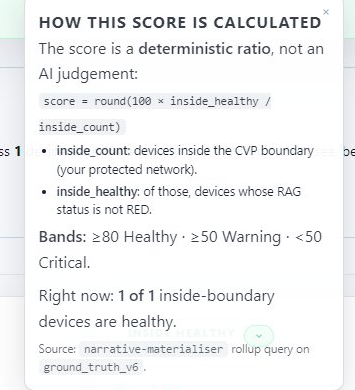
Continue monitoring. Healthy devices contribute to the site’s headline security score.
One platform. Three views.
The same underlying data, rendered three ways — for the executive who needs the headline, the IT operator who runs the day, and the SOC analyst who needs the evidence trail. Click between views.

What the CISO sees on Monday morning. Score. What changed since last week. What needs attention now. Everything else collapses to the score and an action list — drill in only when you need to.

What the IT operator works from. The same data reorganised around three action queues — REMEDIATE (do this now), INVESTIGATE (look into this), MONITOR (keep an eye). Every device drops cleanly into one bucket.
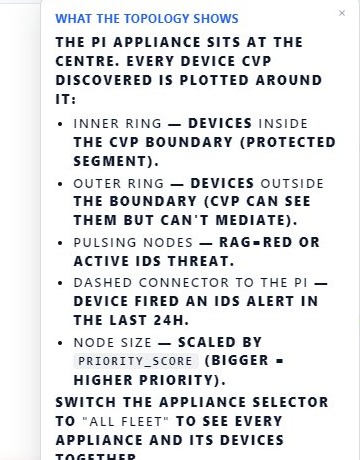
What the SOC analyst pulls up at 2am. Boundary topology, vulnerability funnel, raw IDS evidence, AI provenance footer — drill from headline to raw evidence in two clicks. This is the view that proves CVP is operator-grade, not a dashboard demo.
Click any device. See the full evidence trail.
The network view shows every device, the CVP boundary, and live traffic. Click any device — a drawer opens with its full classification trail: what fired, when, why it’s in this state, what to do next.

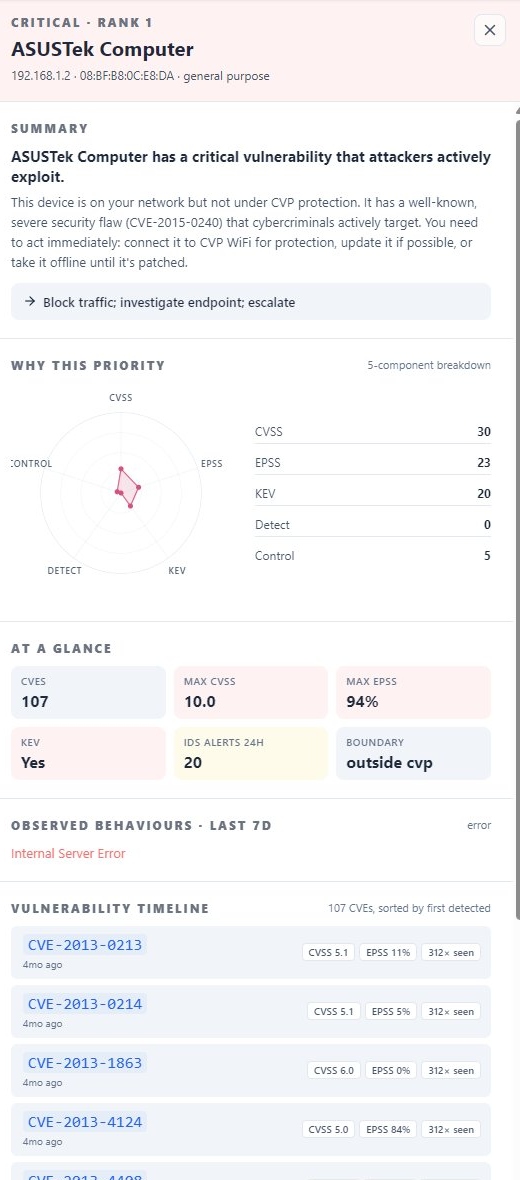
AI explains. AI doesn’t decide. Both are auditable.
Every score is calculated by a deterministic engine you can audit line by line. AI is used only to translate findings into plain-language explanations — every explanation carries a full provenance trail.
One small box. Three sizes.
The same software pipeline runs on every model. Pick the size that matches the site, choose the wireless mode that matches the site’s existing infrastructure. Click between models to compare.
Edge S — integrated Wi-Fi
For remote offices, home installations, and small distributed sites. Wi-Fi is built in — plug it in and it’s ready. Common pick for third-party and BPO sites.
- Capacity1–20 devices
- Form factorDesktop / mountable
- WirelessIntegrated 802.11 dual-band Wi-Fi
- WiredDual Ethernet
- DeploymentPlug-and-play · ships pre-provisioned per customer
- Typical fitRemote workforce, branch, BPO desks, M&A scout sites
Edge M — decoupled wireless
For mid-size offices, mixed wired/Wi-Fi environments, and most third-party sites. Works alongside existing wireless infrastructure or with CVP-supplied access points.
- CapacityUp to 200 devices
- Form factor1U rack / shelf
- WirelessDecoupled — see modes below
- WiredMulti-port managed
- DeploymentOnboarded via portal · no AWS knowledge required
- Typical fitMid-sized branch, regional office, mid-market HQ
Edge L — decoupled wireless at scale
For larger sites and headquarters environments. Same wireless options as Edge M, kept consistent so the deployment story doesn’t change with scale.
- CapacityUp to 500 devices
- Form factor1U rack
- WirelessDecoupled — same modes as Edge M
- WiredHigh-port-count managed
- DeploymentOnboarded via portal · no AWS knowledge required
- Typical fitHeadquarters, large branch, manufacturing site
See the platform in action.
A short demo on a live CVP reference system. We’ll walk you through the appliance, the eight-state surface, the AI-explained portal — and answer the questions you actually have.